-
Shop
- Adidas
- Advanced Technologies
- AI Skills Mastery 2026 Collection
- Best-Sellers
- Car Accessories
- Dating & Social Skills
- Digital Resources
- AI Skills
- Beauty
- Budgeting & Saving
- Car Buying & Ownership
- Cozy Feast Collection
- Electronics & Technology
- Entrepreneurship & Business Growth
- Financial Education
- Financial Independence
- Financial Mindset & Psychology
- Goal Setting
- Hobbies
- Home Styling & Organization
- Leadership
- Mindfulness
- Mindset
- Parenting & Child Development
- Personal Style & Fashion
- Pet Lifestyle & Wellness
- Positive Thinking
- Sleep Improvement
- Smart Life with AI
- Stress Management & Relaxation
- Travel Planning
- Yoga & Fitness
- Yoga & Mind-Body Practices
- Education & Learning
- Family & Parenting
- Fashion
- Furniture
- Gadgets
- Health & Beauty
- Health & Wellness
- Home & Garden
- Jewelry
- Kids & Babies
- Kitchen
- Kitchen Best-Sellers
- Nike
- Patio, Lawn & Garden
- Personal Growth
- Pet Care
- Pet Supplies
- Pets
- Sport & Outdoors
- Travel
- Wealth
- YouTube Shorts Best-Sellers
- Popular
- Best deals
1000V Non-Contact Voltage Tester Pen + Screwdriver Guide
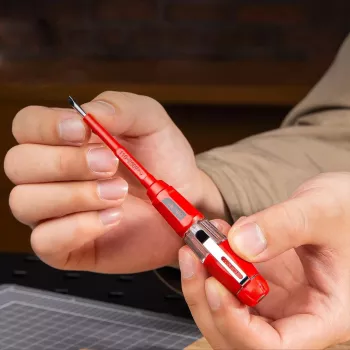
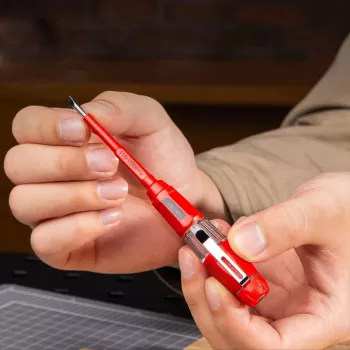
1000V Insulated Voltage Tester Pen with Non-Contact Induction & Screwdriver Function
A compact voltage tester pen can speed up basic electrical checks while keeping hands farther from live parts. The 1000V Insulated Voltage Tester Pen with Non-Contact Induction & Screwdriver Function combines non-contact AC voltage detection with a built-in screwdriver tip, making it a practical choice for quick screening, outlet and switch checks, and routine troubleshooting—when paired with proper electrical safety practices and verification steps.
What This Tool Is Designed For
- Quickly screening for the presence of AC voltage without touching exposed conductors
- Identifying live vs. non-live wires before handling (as an initial check, not a substitute for lockout/tagout)
- Checking outlets, switches, extension cords, and junction boxes for energized conditions
- Light-duty tightening/loosening tasks using the screwdriver function (where appropriate and safe)
For safety guidance that applies across job sites and home maintenance alike, review recognized standards and recommendations such as OSHA electrical safety and the overview of NFPA 70E.
Key Features at a Glance
- 1000V insulation rating for improved protection during near-contact work (still requires safe work practices)
- Non-contact induction detection to sense electric fields around live AC conductors
- Pen form factor for pocket carry and one-hand checks
- Integrated screwdriver function for simple hardware adjustments (use only after verifying de-energized conditions when required)
How Non-Contact Induction Detection Works (Practical Explanation)
Non-contact voltage detection is built around a simple idea: energized AC wiring creates an alternating electric field. When you bring the tester tip near that field, the sensor detects changes and alerts you (often with a beep/light), allowing a quick “presence check” without direct metal-to-metal contact.
- A live AC conductor produces an alternating electric field; the sensor in the tip detects changes in that field.
- Detection strength depends on distance, conductor insulation thickness, cable shielding, and whether the circuit is loaded.
- False negatives can occur on shielded cables, low-voltage control wiring, or when the conductor is deeply recessed.
- False positives can occur from nearby energized cables, static, or induced/ghost voltage—confirm with a contact meter when needed.
It’s a fast, convenient first pass, but it’s not a substitute for a proper measurement when the outcome determines whether it’s safe to touch conductors or proceed with repair work. For more on voltage detector concepts and testing expectations, the IEC 61243-3 overview is a helpful reference point.
Safe, Reliable Use: A Simple Verification Routine
For consistent results, build a repeatable routine that verifies the tester before and after checking a circuit. This reduces the chance of relying on a weak battery or a damaged sensor.
- Test the tester first: verify the pen indicates near a known-live source (a powered outlet or a confirmed live cable).
- Scan before touch: bring the tip near the target wire, outlet slots, switch box, or cable jacket; move slowly to localize the live area.
- Confirm before work: if work requires de-energized conditions, shut off power, then re-test and verify again on a known-live source (live–dead–live approach).
- Keep boundaries: avoid contacting bare conductors; use proper PPE and follow local electrical codes and safety rules.
- Use a proper meter when decisions matter: for troubleshooting, identifying neutral/hot, or verifying absence of voltage under lockout/tagout conditions.
Live–Dead–Live Quick Checklist
| Step | What to do | Why it matters |
|---|---|---|
| 1 | Check pen on a known-live source | Confirms the tester and battery are working |
| 2 | Test the target circuit/cable | Screens for energized conditions before handling |
| 3 | Re-check on a known-live source | Ensures the tester didn’t fail during the check |
Using the Screwdriver Function Without Creating Risk
The integrated screwdriver function is best treated as a convenience for quick, light-duty adjustments—like snugging a cover plate screw or handling small hardware—after the circuit status is confirmed. It should not be viewed as a replacement for dedicated insulated electrician screwdrivers that carry specific certifications and are chosen for the task and environment.
- Treat the screwdriver function as a convenience for small tasks, not as a replacement for insulated electrician drivers with certified ratings.
- Before tightening terminal screws or opening devices, verify de-energized status using a proper method (non-contact pen plus a contact meter where appropriate).
- Avoid working inside energized panels or devices unless trained and authorized; non-contact detection does not guarantee safe conditions.
Where This Tester Pen Is Most Useful
For a small workspace setup, pairing a tester pen with simple organization helps reduce clutter and accidental tool drops. Magnetic Hooks can be handy for keeping lightweight tools within reach on metal shelving, tool chests, or garage cabinets (always keep them away from energized equipment and moving parts).
Limits and Common Misreads to Watch For
Care, Storage, and Basic Troubleshooting
Product Snapshot
At-a-Glance Details
| Item | Detail |
|---|---|
| Product name | 1000V Insulated Voltage Tester Pen with Non-Contact Induction & Screwdriver Function |
| Primary function | Non-contact voltage presence detection |
| Secondary function | Screwdriver function |
| Price | $3.01 USD |
| Availability | In stock |
FAQ
Can a non-contact voltage tester confirm that power is off?
No—it’s a helpful screening tool, but it isn’t definitive. Use a live–dead–live routine and a contact meter when you must verify absence of voltage before touching conductors or proceeding with work.
Why does a tester pen sometimes beep near a cable that is supposedly off?
This can happen due to induced/ghost voltage, nearby energized conductors, or the pen sensing an electric field through insulation. If the result is unclear, confirm with a contact tester and separate or reposition cables when possible.
Will this work on DC wiring or batteries?
Most non-contact pens are designed to detect AC electric fields, so DC circuits and batteries typically won’t trigger the sensor. Use a multimeter for reliable DC measurements.














Leave a comment